Emergency Procedures Release Notes
System Requirements
November 2025 Release
Release Dates
Train: 11.19.2025
Production: 11.20.2025
New Features
Dark Theme option for logged in Emergency Procedures users
- Last theme selected will be saved and presented to the user at next login
- Light theme is the default
Existing Feature Improvements:
Updates to further clarify that certain Emergency Procedures message types may lead to Performance Assessment Intervals (PAIs) but do not mean a PAI is in effect. PAI data of record found in PJM’s Data Miner application.
- PAI Trigger tags changed to potential PAI tags.
- Dashboard banner text changed to “A potential PAI Emergency Procedures message is active. Data Miner is the PAI data of record.”
- Data Miner URL on Dashboard banner changed to the Five Minute PAI Intervals page.
- Message banner text changed to “This Emergency Procedures message type is a potential PAI, see Data Miner”.
- Removed “PAI” from Emergency Procedures email notifications.
Link to Related User Guide or Material
Product Roadmap - Emergency Procedure PDF
Previous Releases
Release Dates
Train: 6.12.2025
Production: 6.19.2025
New Features
- Message ID filter added to the Postings Dashboard
- This will override other filter options if used
- Disabled/Retired Message Types automatically removed from the Selected message types list on user profiles
- EP profile will be disabled when a user’s account is terminated
Existing Feature Improvements:
Update to Email Address setup process:
- New Status: Pending Confirmation
- Separate column for Confirmation Code
- Notification if there are unverified email addresses
Release Dates
Train: 2.20.2025
Production: 2.27.2025
About This Release
This release is to remove the tag from the CLI download of PAI Trigger messages. PAI Guidance tab on the UI was removed as part of December 2023 changes to Performance Assessment Intervals (PAI).
Release Dates
Train: 12.11.2023
Production: 12.11.2023
About This Release
This release includes enhancements to support changes to the definition of Emergency Action - for purposes of determining Performance Assessment Intervals (PAI).
Existing Feature Improvements
- New language in all the banners related to PAI.
- Removal of the PAI Guidance tab.
- Replacement of “PAI” (e.g. “PAI Only” checkbox on the Postings page) with “PAI Trigger”.
Link to Related User Guide or Material
Product Roadmap - Emergency Procedure PDF
Release Dates
Train: 1.9.2023
Production: 1.12.2023
About This Release
This release includes enhancements to support 2022 Reserve Price Formation changes.
New Features
Reserve Area column added to the Regions page to identify what Reserve Area(s) a region is part of.
Product Roadmap - Emergency Procedure PDF
Release Dates
Train: 12.22.2020
Production: 1.27.2021
About This Release
This release includes enhancements to the User Profile and Performance Assessment Interval functionality in Emergency Procedures (EP) as well as addition of hierarchy information between EP regions.
New Features
Zone/Region Hierarchy
- Functionality to view and apply the hierarchy between EP regions
Existing Feature Improvements:
User Profile Enhancements
- Ability for users to set up profiles and manage preferences for their dashboard view
- Summary view of profile selections
- Ability to manage email notifications per profile
PAI Enhancements
- Enhancements to the PAI functionality and reports resulting from October 2019 PAI events feedback
January 2021 Enhancements
Contact: Emergency Procedures Admins
Release Dates
Train: 12.22.2020
Production: 1.27.2021
About This Release
This release includes enhancements to the User Profile and Performance Assessment Interval functionality in Emergency Procedures (EP) as well as addition of hierarchy information between EP regions.
New Features
Zone/Region Hierarchy
- Functionality to view and apply the hierarchy between EP regions
Existing Feature Improvements:
User Profile Enhancements
- Ability for users to set up profiles and manage preferences for their dashboard view
- Summary view of profile selections
- Ability to manage email notifications per profile
PAI Enhancements
- Enhancements to the PAI functionality and reports resulting from October 2019 PAI events feedback
January 2021 Enhancements
Contact: Emergency Procedures Admins
Release Dates
Train: 10.6.2020
Production: 10.21.2020
About This Release
This release is to upgrade the Emergency Procedures framework with the updated styling reflected in the other PJM Tools.
Enhancements
New Look
- Color scheme changed updated to enhance visual clarity
- Addition of Session Timer; 24-hour display for EP users
Contact: Emergency Procedures Admins
Release Dates
Train: 5.3.2018
Production: 5.10.2018
I. Overview
- Performance Assessment Hour converted to Performance Assessment Internal to support 5-
Minute Settlements.
- Parent Region column added to Regions tab.
- Reduction Start Time added to Load Management Reduction messages.
II. User Interface Changes
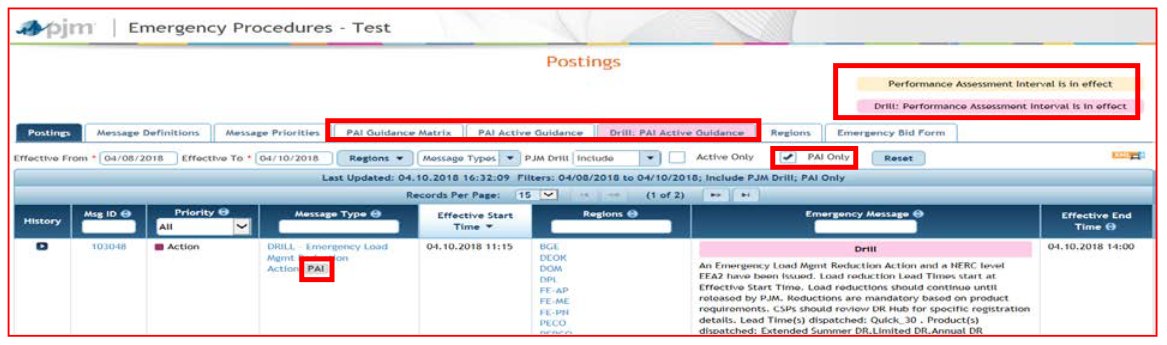
- Instances of PAH (Performance Assessment Hour) changed to PAI (Performance Assessment Interval) on global banners, tabs, posting tags, Message Definitions page and Active Guidance hyperlink
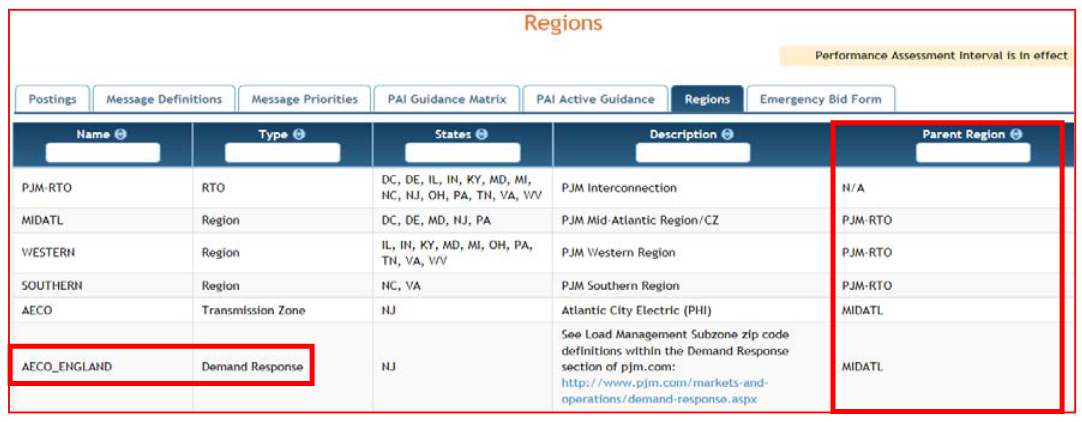
- Demand Response subzones added to Regions tab
- Parent Region column added to Regions tab
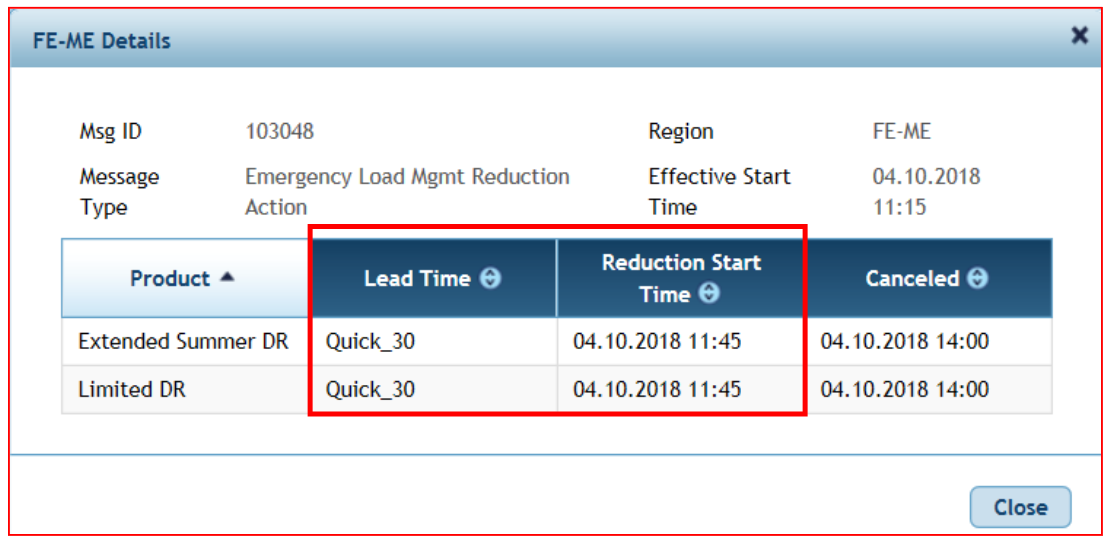
- Reduction Start Time added to Regions details for Pre-/Emergency Load Management Reduction messages from DR Hub
III. XML Download Changes
- tag changed to
- added for Pre-/Emergency Load Management Reduction messages from DR Hub
IV. XML Download Changes
- Email subject changed from ‘Emergency Procedures (PRD) PAH’ to ‘Emergency
Procedures (PAI)’ for messages that are PAI triggers
Contact: Emergency Procedures Admins
Release Dates
Sandbox release (XML, Timestamp and Flags): 4.28.2016
Production release (XML, Timestamp and Flags) 5.5.2016 (NOTE: Summer EP Training, including relevant CP changes 5.10.2016)
Sandbox/Production release (Notifications – email/text notifications out of EP) 5.26.2016
About This Release
UPDATE TO EMERGENCY PROCEDURES TO SUPPORT CP/PAH (CAPACITY PERFORMANCE/PERFORMANCE ASSESSMENT HOURS)
I. Overview
In current Emergency Procedures:
- Only one timestamp for messages
- Currently called Posting Timestamp and Cancellation Timestamp on the web application
- Presented in the current XML format as
- 2016-02-03T15:18:27.982Z
- 2016-02-03T15:47:00.059Z
- No CP indicators or PAH Guidance
- Current XML uses underscores in element names (non-standard practice)
In updated Emergency Procedures:
- Messages will have 3 timestamp pairs
- Effective Start and Effective End - These times are the actual times of the CP event. This is the time that the Communication (All-Call or Phone) went out to members around event initiation and termination
- Applicable Start and Applicable End - Applicable times are used when a message is issued in advance. For example in Cold Weather Alerts PJM uses language such as “Cold Weather Alert has been issued for 02.13.2016 from 01:00 to 23:00 hrs” In this example, the 01:00 is the Applicable Start time and 23:00 would be the Applicable End time
- Posting and Cancellation timestamps – The time the message was posted/cancelled in the EP application
- Messages will display the Effective Start and Effective End times on the main message UI of the application in place of Posting Timestamp and Cancellation Timestamp. Message posting and cancellation timestamps, along with the applicable regions will be posted in the history area of each posting
- Messages that are CP/PAH related will have an indicator on the message. Within this indicator there will be a hyperlink to another page within the application for resource guidance by zone
- There will be a global indicator on the UI to illustrate a PAH event is in effect
- There will be a new tab that will illustrate general guidance for the various resource types for the various PAH-related EP message types
- Changes to the EP XML/XSD are as follows:
- Addition of two new time/date fields:
- effectiveStartTime, /effectiveStartTime | effectiveEndTime, /effectiveEndTime
- applicableStartTime, /applicableStartTime| applicableEndTime, /applicableEndTime
- Change to posting timestamps field names:
- postedTimestamp, /postedTimestamp
- canceledTimestamp, /canceledTimestamp
- Addition of a specific flag (true/false) called to delineate PAH EP messages
- New XML section called PAH guidance showing zonal details. Each zone will be delineated with related posting ID and effective time. Example:
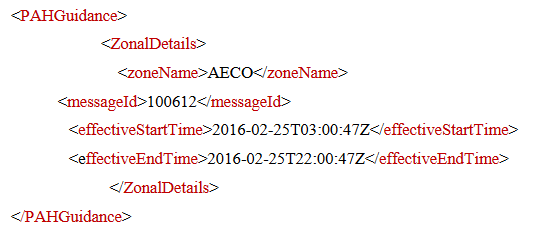
- Non-PAH postings will not have a section
No changes to the PJM CLI (Command Line Interface) to retrieve the XML data from Emergency Procedures
Contact: Emergency Procedures Admins
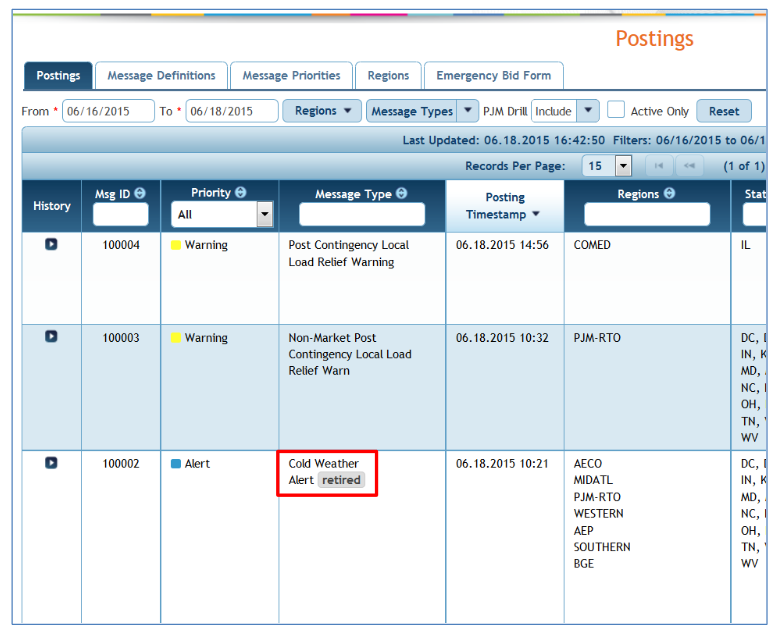
- Retired tag added to Message Type on the Postings page to indicate that the Message Type is no longer being used.
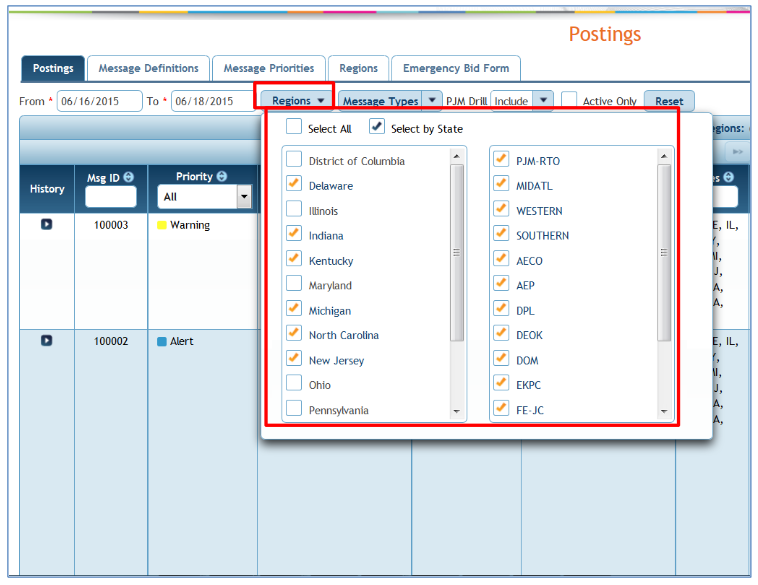
- Option to filter Region list by States added to Region filter on Postings page.
- Check ‘Select by State’
- Select desired states
- Region list on the right will be updated and postings filtered accordingly
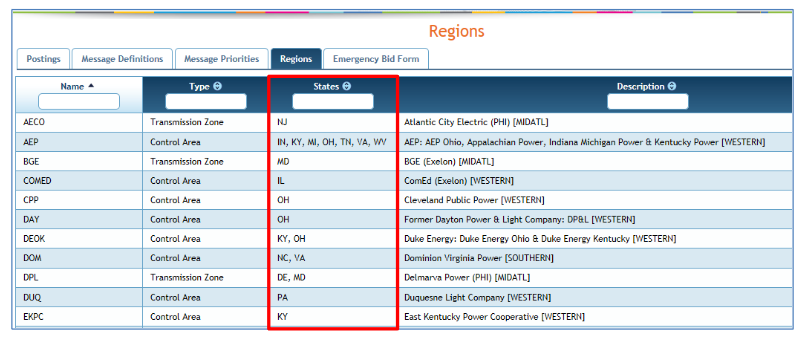
- States column added to Regions page.
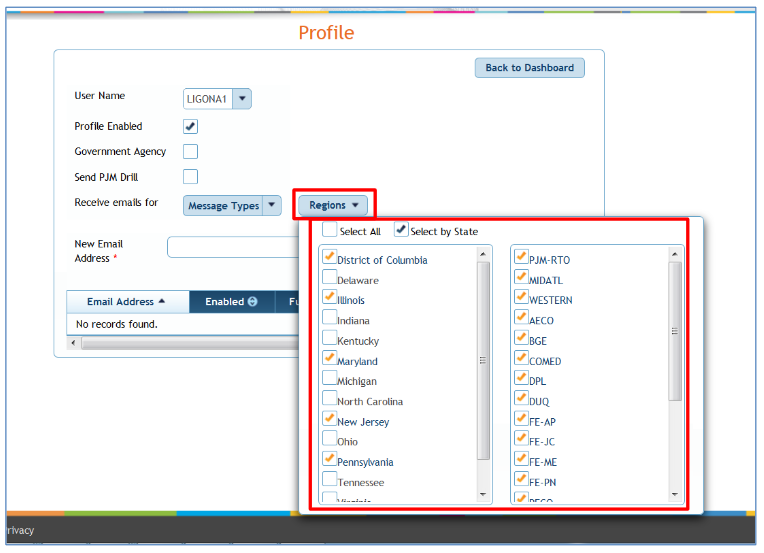
- Option to filter Region list by States added to Region filter on Profile.
- Check ‘Select by State’
- Select desired states
- Region list on the right will be updated and postings filtered accordingly